

AI-901: Model Deployment Options and Configuration Parameters
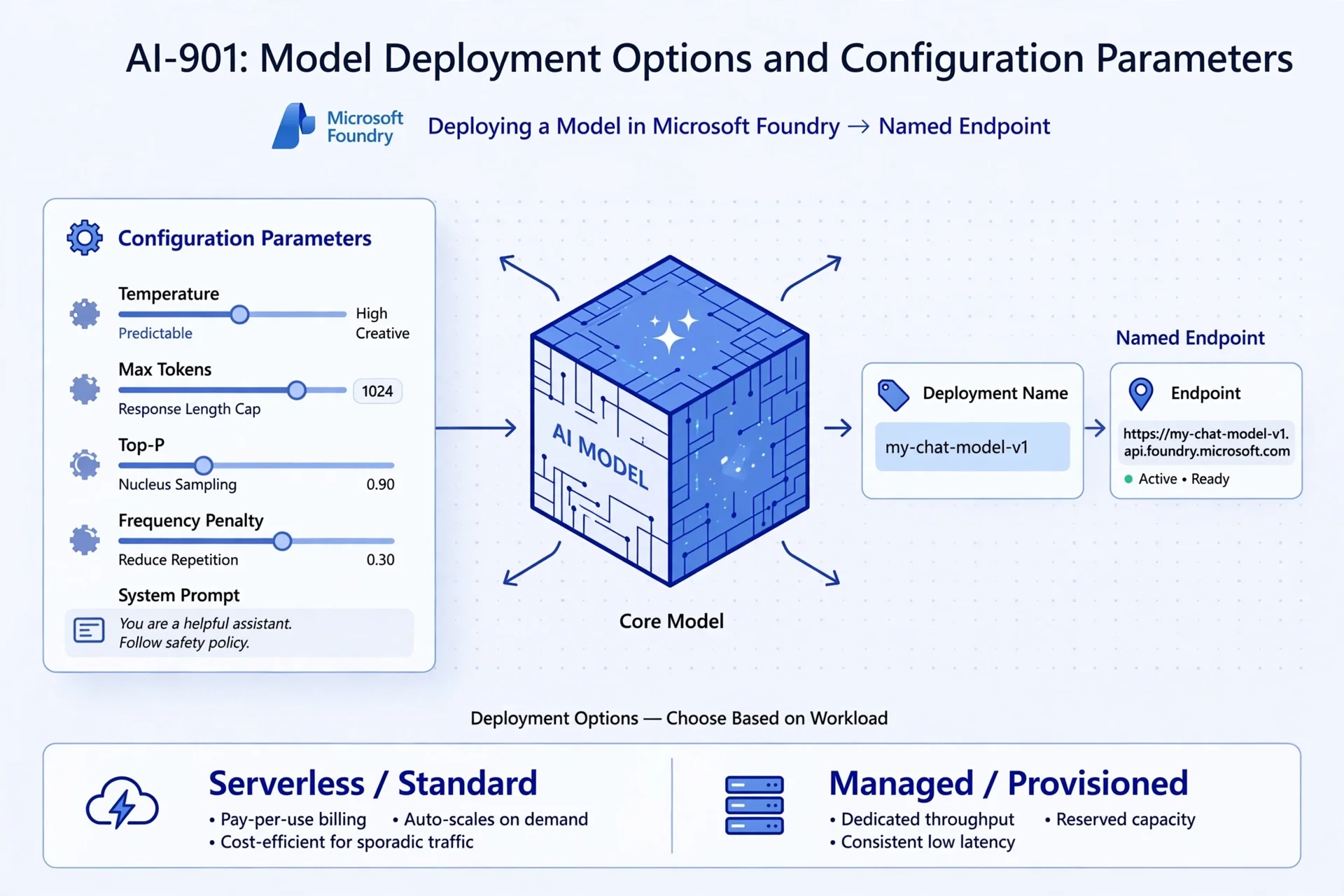
AI-901 - Understanding model deployment
Choosing a model is only half the job. Before an application can use it, you must deploy it in Microsoft Foundry and tune the inference parameters that dictate how it responds. The AI-901 exam expects you to recognize these deployment options and understand what the common configuration dials do in plain terms.
Deploying gives your application a named endpoint to call. Configuration parameters—like temperature and max tokens—shape the output without changing the underlying model itself.
What the Exam Expects You to Know
This study guide covers the Microsoft AI-901 objective: Identify appropriate model deployment options and configuration parameters.
You need to know:
Models are deployed in Microsoft Foundry under a deployment name and endpoint.
The difference between deployment options (e.g., serverless vs. managed/standard).
How inference parameters (temperature, max tokens, top-p, penalties, and the system prompt) control the output.
Expect scenario-based questions: the exam may show a parameter and ask for its effect, or describe a model's behavior and ask which dial to adjust.
Deploying Creates a Named Endpoint
In Microsoft Foundry, you select a model from the catalog and deploy it to your project. This deployment provides two mandatory components for your application:
Deployment name: The string identifier your code passes when calling the model.
Endpoint: The URL/address the application sends its API requests to.
Once deployed, the model is ready for inference. Your app calls the deployment name at the endpoint, sends a prompt, and reads the response.
Rule of thumb: Deploying happens once to provision the model. Calling (inference) happens every time the application runs.
Deployment Options: Hosting and Billing
Foundry offers multiple ways to deploy a model. You don't need deep architectural knowledge for the AI-901, but you must recognize the high-level trade-offs between cost, scale, and performance.
| Option | How it Works | Ideal Use Case |
|---|---|---|
| Serverless / Standard | You hit a managed endpoint and pay-per-use (tokens). No infrastructure to manage. | Most generative AI apps; highly variable or lower-volume traffic. |
| Managed / Provisioned | You reserve dedicated compute capacity for predictable throughput. | High, steady volume applications requiring consistent latency. |
Note: The deployment option does not change the model's intelligence or capabilities. The model remains exactly the same; only the hosting and billing mechanism changes.
Temperature Controls Randomness and Creativity
Temperature controls the randomness of the model's response. It is one of the most frequently tested configuration concepts.
Low temperature: Produces focused, predictable, and highly repeatable answers. Ideal for factual Q&A, data extraction, and strict support bots.
High temperature: Produces varied, creative, and less predictable answers. Ideal for brainstorming, drafting marketing copy, or ideation.
Example: A strict IT policy bot requires consistency and should run at a low temperature. A marketing tool generating campaign slogans needs fresh ideas and should run at a higher temperature.
Max Tokens Caps Response Length
Max tokens (or maximum output length) sets a hard limit on the number of tokens the model can generate in a single response.
Why you must configure it:
Cost control: You pay for output tokens. Caps prevent runaway billing.
Formatting: Keeps responses concise.
Truncation risk: If set too low, the model will cut off mid-sentence.
Example: If you need quick, scannable UI text, set a low max tokens value. If you are generating full-page document summaries, raise the limit so the output isn't shortened.
Top-P, Penalties, and the System Prompt
You need to recognize a few additional parameters for the exam:
Top-P (Nucleus Sampling): An alternative way to control randomness. The model only considers the most probable tokens adding up to a specific probability mass. Standard practice is to adjust either Temperature or Top-P, not both.
Frequency penalty: Decreases the likelihood of the model repeating the exact same tokens, reducing redundant text.
Presence penalty: Nudges the model to introduce new topics rather than circling the same concepts.
System prompt (Meta-prompt): Defines the assistant's role, tone, and strict guardrails. While not a numerical sampling parameter, it is a foundational configuration that dictates the model's overall behavior.
Exam Tip: Map the behavior to the parameter.
Need predictable answers? Lower the temperature. > * Answers getting cut off? Raise max tokens. > * Model repeating itself? Raise the frequency penalty. > * Need to set rules and personas? Edit the system prompt. > * Where does the app get its connection info? Foundry deployment (Endpoint/Name).
Common Trap: Do not confuse temperature with max tokens. Temperature dictates creativity; max tokens dictates length. If you want a highly creative but short response, you need high temperature and low max tokens. They are completely independent dials.
Quick Knowledge Check
A team wants a model to give consistent, predictable answers to policy questions. Should they raise or lower the temperature?
The model's answers keep getting cut off mid-sentence. Which parameter should the team increase?
What two things does deploying a model in Foundry give your application?
Which configuration sets the assistant's role, tone, and guardrails for the conversation?
Answers
Lower the temperature. This produces focused, predictable output.
Max tokens (maximum output length).
A deployment name and an endpoint.
The system prompt.
Microsoft References For Further Study
Cross-reference this guide with the official Microsoft Learn documentation to familiarize yourself with their exact terminology:
